
After a SYSADM password change or expiry, batch jobs stop running because the STARLIMS Manager Service still holds the old credentials. Updating the password in LimsServiceSettings.exe restores normal operation.
Symptom
Batch jobs no longer run. The following error appears in the SYSADM and server log files:
Error in Starlims.Server.WorkerProcess:
Invalid credentials for user: SYSADM
   at Starlims.Server.Worker.Authenticate(IAppConfig appCfg, String user, String pass)
   in WorkerProcess\Main.cs:line 308
Root cause
The STARLIMS Manager Service uses the SYSADM account to authenticate when launching background worker processes. When the SYSADM password is changed — or expires — the Manager Service configuration is not automatically updated and continues to present the old password, causing every batch job launch to fail.
Prerequisites
- Local administrator access on the STARLIMS application server
- The new SYSADM password
Steps
- On the application server, open LimsServiceSettings.exe as Administrator. The default location is:
C:\Program Files (x86)\STARLIMS Corporation\Components\STARLIMS Manager Service R2\
Note: The exact path depends on your installation. If the above path does not exist, search for LimsServiceSettings.exe on the application server drive.
- In the application, locate the entry that uses the SYSADM account to run SRV files.
- Update the password field with the new SYSADM password.
- Save the settings.
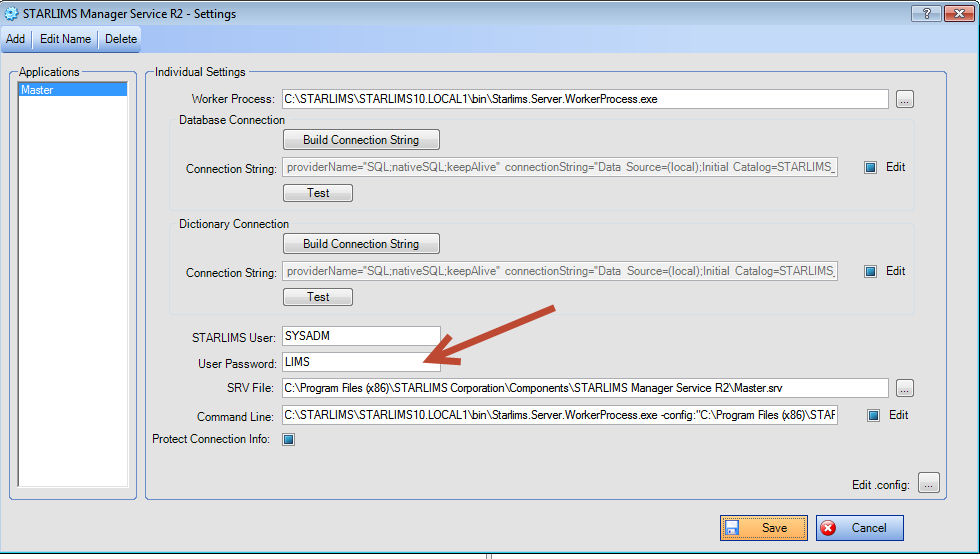
Screenshot: LimsServiceSettings.exe — the STARLIMS Manager Service configuration application. The window shows a list of configured service entries, each with fields for the site/SRV file path, username (SYSADM), and password. The password field for the SYSADM entry is where the updated credential must be entered. After saving, the Manager Service will use the new password for all subsequent batch job launches.
- Restart the STARLIMS Manager Service in Windows Services (services.msc) to apply the new credentials.
- Verify that batch jobs run successfully.
Expected result
Batch jobs resume normal execution. The "Invalid credentials for user: SYSADM" error no longer appears in the log files.
Notes
Note: If your organisation has a SYSADM password rotation policy, update LimsServiceSettings.exe as part of the same change procedure to prevent batch jobs from failing after each rotation.
Note: This issue also occurs when the SYSADM account password expires rather than being manually changed. Consider setting a non-expiring password for service accounts, or using a Group Managed Service Account (gMSA) to avoid manual credential management.
Comments
0 comments
Article is closed for comments.