
The External Audit Trail feature creates database triggers on STARLIMS tables to detect and record inserts, updates, and deletes made by external tools (such as SQL Server Management Studio or Oracle SQL Developer) that bypass the STARLIMS application layer. Enable it when your compliance requirements demand a complete record of all data changes, regardless of the tool used.
Prerequisites
- STARLIMS Administrator access (LIMS_ADMIN role or equivalent)
- Database administrator rights may be required if the STARLIMS database user does not have permission to create triggers
Steps
- Log in to STARLIMS and open the Dashboard.
- Go to Main Menu > Utilities > Settings.
- Click the External Audit Trail Configuration tab.
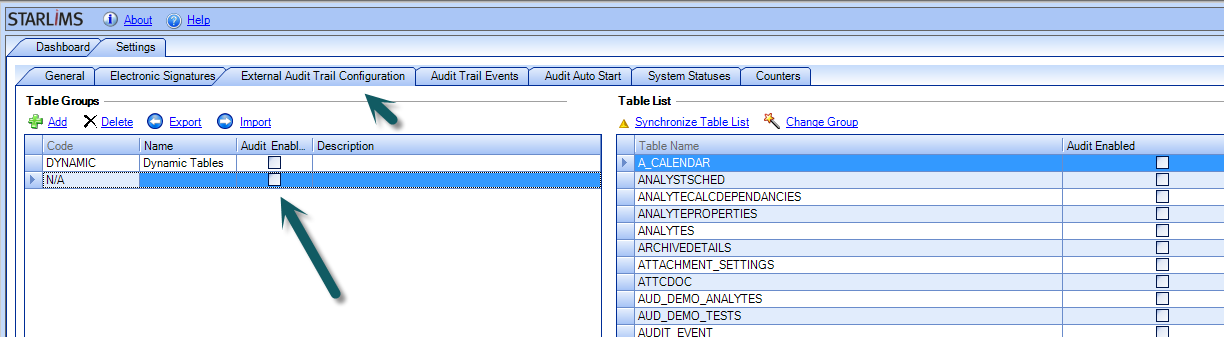
📸 Screenshot: STARLIMS Settings — External Audit Trail Configuration tab. The screen shows two sections: a list of table groups on the left (e.g. Core Tables, Results Tables, Order Tables) and a list of individual tables on the right. Each row has an Enable/Disable toggle. You can activate the external audit trail for an entire group or for specific tables individually.
- Enable the External Audit Trail for the required scope: select a table group to enable it for all tables in that group at once, or select individual tables to enable it selectively.
- Save the configuration.
Expected result
STARLIMS automatically creates database triggers on each enabled table. The triggers fire on INSERT, UPDATE, and DELETE operations — including those executed directly in the database using external tools. The changes are recorded in the audit trail and are visible in the standard STARLIMS audit trail reports.
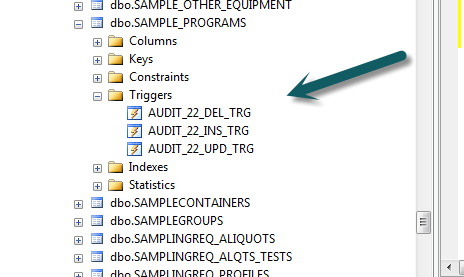
Screenshot: SQL Server Management Studio (or Oracle equivalent) — the Triggers folder under an enabled STARLIMS table (e.g. RESULTS) in the database object tree. STARLIMS-created triggers are listed here, one per operation type (INSERT, UPDATE, DELETE). Their presence confirms that external audit trail is active for that table.
Notes
Warning: Enabling the External Audit Trail on high-volume tables (such as RESULTS or ORDTASK) will increase the write overhead on those tables. The impact is generally small but should be assessed in a test environment before enabling in production on large or heavily loaded systems.
Note: The External Audit Trail records changes made outside STARLIMS only. Changes made through the STARLIMS application are captured by the standard STARLIMS Audit Trail (AUDITTRL table), which operates independently.
Note: If triggers are not created after enabling the configuration, verify that the STARLIMS database user has CREATE TRIGGER permission on the target tables.
Comments
0 comments
Article is closed for comments.